Black car booking and dispatch, inside WordPress
Black car work is fast and repeat: the same clients, airports and hotels every week. Chauffeur Plugin makes rebooking a one-minute job for clients and keeps every trip on one dispatch board for you.
In short
Chauffeur Plugin is black car booking and dispatch software that runs inside WordPress. Clients get an instant point-to-point price and book in under a minute; regulars sign in with an email link and rebook from their account. Flight tracking, saved cards for charges after the trip, a dispatch board and a driver app are all included for one yearly price per website, with no commission.
The problem
What slows operators down
Repeat clients retyping everything
Regulars want to book in seconds, not fill the same form every time.
Dispatch in a WhatsApp group
Jobs get missed or doubled when assignments live in chat threads.
Extras after the trip
Waiting time, parking and tolls are hard to collect once the client has left.
How Chauffeur Plugin helps
Built into WordPress for black car services
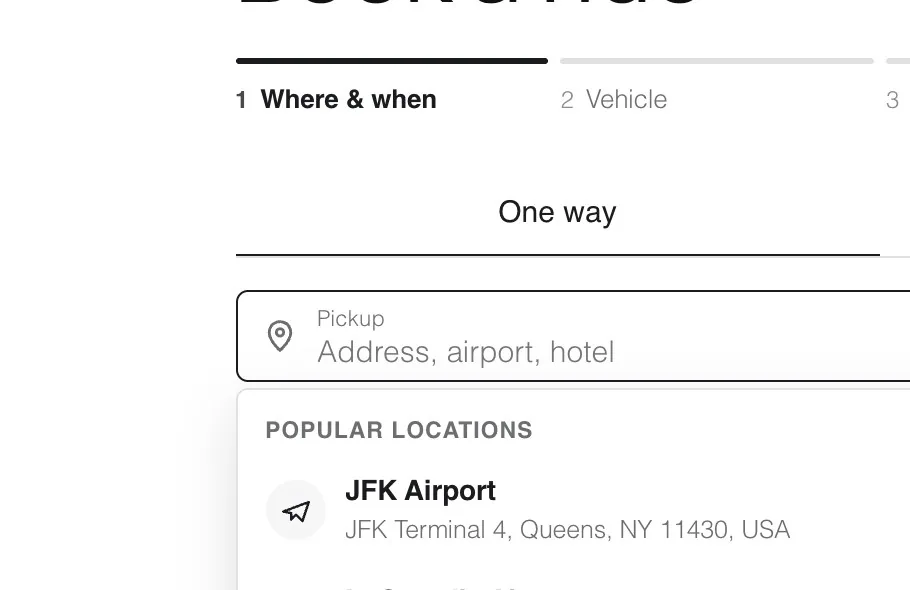
- Popular locationsAirports and hotels your clients use, one tap away in every address field.
- Driver appChauffeurs accept jobs, navigate and tap through each trip on their phone.
- Bookings and quotesCharges after the trip are approved in the drawer and collected in one click.
- NotificationsConfirmation, chauffeur on the way and reminders go out by themselves.
- Flight trackingAirport pickups move with late flights, so chauffeurs don't wait unpaid.
- Company accounts and invoicesCorporate clients book on account and get one invoice a month.
How it works
How a booking works, start to finish
- 01
Quote in seconds
Pickup and drop-off from Popular locations or Google suggestions, then a price for each class.
- 02
Pay with a saved card
Stripe saves the card so waiting time, parking and tolls can be charged later.
- 03
Assign on the board
Drag the trip onto a chauffeur; overlaps and short gaps are flagged.
- 04
Track the trip
The client gets "your chauffeur is on the way" with a live map and the car's details.
- 05
Collect the extras
The chauffeur logs waiting and tolls; you approve and collect in one click.
Set it up
The settings that matter for this work
Each one links to a step-by-step guide in the Help Center.
One licence, no add-ons
Everything included, from day one
No modules to buy, no higher tier to unlock, no fee per vehicle or booking.
- Booking form with instant prices
- Quick form for your home page
- Distance, hourly, zone and tour pricing
- Pricing rules, extras, fees and promo codes
- Stripe, Square, PayPal, Mollie and cash
- Deposits and charges after the trip
- Dispatch board and driver app
- Flight tracking and name sign
- Live tracking link for clients
- Email, SMS, WhatsApp and Telegram
- Company accounts and PDF invoices
- Reviews, reports and CSV exports
- AI booking assistant
- Seven booking form languages
- Partners and farm-out
Do the maths
What you keep by switching
Enter what you pay today for booking software. One licence covers your website with every feature and no commission.
Monthly limo platforms commonly charge about $99 to $199 a month, some with a fee per booking or vehicle. Google Maps and payment-provider fees are paid either way, so they are left out.
Your software costs now
$1,788 a year
Chauffeur Plugin, every feature, no add-ons
$89.99 a year
You keep
$1,698
a year, or $5,094 over three years
Is it right for me?
What operators ask before they switch
I'm not technical.
If you can edit a page in WordPress, you can set it up. A ten-minute setup guide and a Help Center guide for every setting walk you through it.
I already use other software.
Try it free for 14 days next to your current system, on a staging copy if you like. Switch when you're happy; nothing to cancel otherwise.
Will it work with my theme?
Yes. The forms keep their own layout in any theme, take your font and colours, and work with blocks, Elementor or shortcodes.
What does it really cost?
One licence per website, from $89.99 a year or $249.99 once, with every feature. You pay Google Maps and your payment or SMS provider directly, at their rates.
Where is my data?
In your own WordPress database. Bookings and clients never pass through our servers.
What if I need help?
Contact us and we reply within one business day. There's a 14-day money-back guarantee after you buy.
Can clients save their card?
Yes, with Stripe. Saved cards are used for charges after the trip, such as waiting time, parking and tolls.
Do chauffeurs need an app store app?
No. The driver app is a page on your website that chauffeurs add to their home screen. They sign in with an email link.
Can regular clients rebook quickly?
Yes. Clients sign in with an email link, see their past trips and book again. Saved passengers make booking for colleagues quick.
How do I collect waiting time and tolls?
The chauffeur enters minutes waited, parking and tolls when completing the job. Approve them in the booking drawer and click Collect: the saved card is charged, or the client gets a payment link.
Can I send a trip to another operator when I'm full?
Yes. Farm it out to a partner from the booking drawer. They accept on a private page, add their chauffeur and car, and your client gets your usual messages.
Does the client see where the car is?
Yes. When the chauffeur taps On my way, the client gets a tracking link with the car on a map, the chauffeur's name and an arrival estimate.
Do I need to buy add-ons?
No. Every feature on this page is included in every licence and available as soon as you activate the plugin. You only pay outside services you choose, such as Google Maps or an SMS provider, directly.
Start taking black car services bookings on your site
Try every feature free for 14 days. No card needed, no commission on your bookings, ever.